> ## Documentation Index
> Fetch the complete documentation index at: https://developer.z-api.io/llms.txt
> Use this file to discover all available pages before exploring further.
# Send action buttons
> Send a message with action buttons (link, call or reply)
## Overview
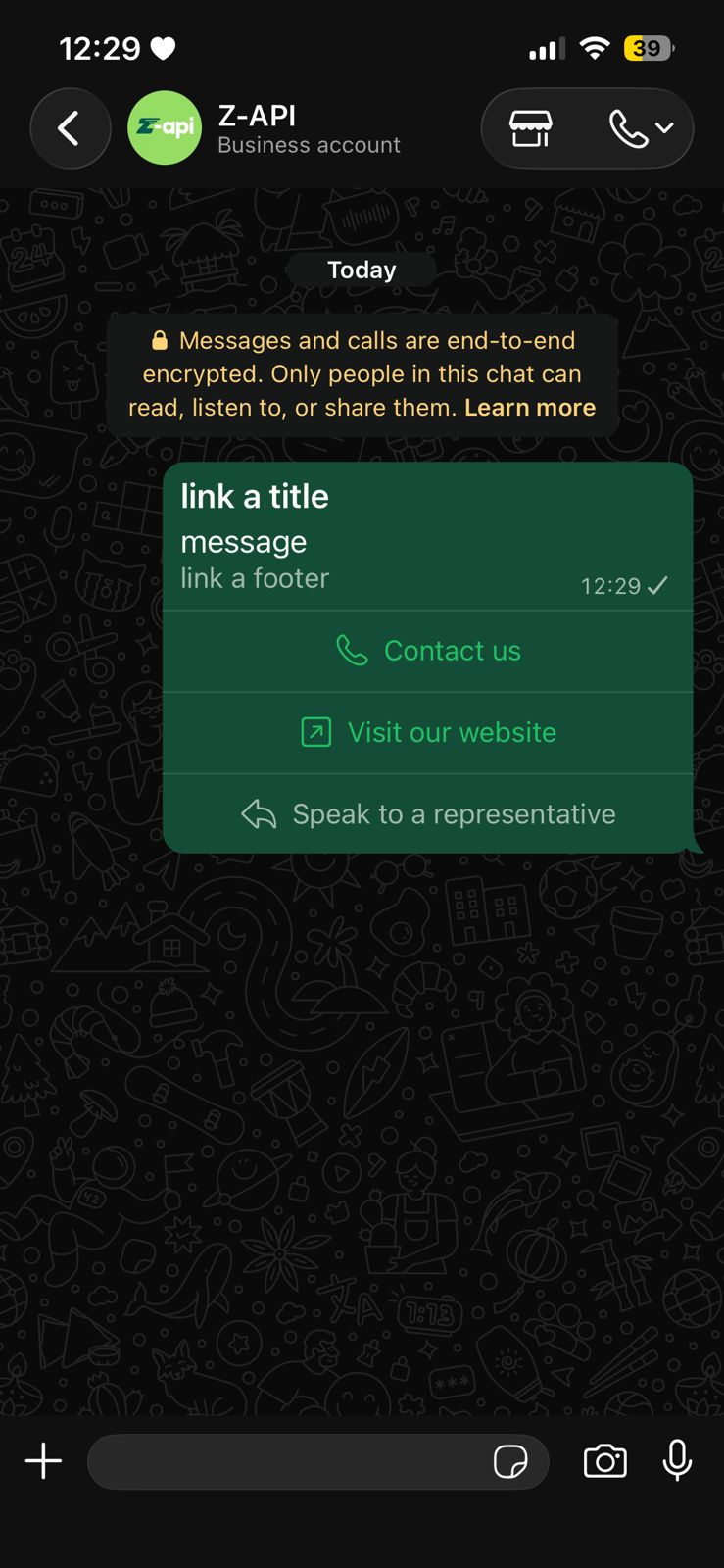
With this method you can send text messages with action buttons that redirect to links, initiate calls, or provide standard responses.
Button sending is currently available, but there are some decisive factors for it to work. Check the [button status](/en/tips/button-status) topic for more information.
**ATTENTION**
Sending all three button types simultaneously causes an error on WhatsApp Web. Combine CALL and URL buttons together, and send REPLY buttons separately.
***
#### Example on WhatsApp
***
## Attributes
### Header
Your instance ID. Available in the Z-API panel under **Instances**.
Your Z-API instance token.
### Required
Recipient's phone number (or group ID for group messages) in DDI DDD NUMBER format. E.g.: 551199999999
Message text
Array of action buttons
Button identifier
Button type: `CALL`, `URL` or `REPLY`
Text displayed on the button
Phone number (required for CALL type)
Link URL (required for URL type, must start with http\:// or https\://).
**Tip:** WhatsApp has a specific link for copying text. By passing this link in the `url` attribute, your button becomes a copy button: `https://www.whatsapp.com/otp/code/?otp_type=COPY_CODE&code=otpyourcode`
### Optional
Message title
Message footer
Image link or Base64
***
## Request Body
**CALL and URL buttons (together):**
```json theme={"theme":{"light":"github-light","dark":"poimandres"}}
{
"phone": "551199999999",
"message": "a message",
"title": "if you want to add a title",
"footer": "if you want to add a footer",
"image": "https://app.z-api.io/logos/zapi-dark.png",
"buttonActions": [
{
"id": "1",
"type": "CALL",
"phone": "554498398733",
"label": "Contact us"
},
{
"id": "2",
"type": "URL",
"url": "https://z-api.io",
"label": "Visit our website"
}
]
}
```
**REPLY button (separate):**
```json theme={"theme":{"light":"github-light","dark":"poimandres"}}
{
"phone": "551199999999",
"message": "a message",
"title": "if you want to add a title",
"footer": "if you want to add a footer",
"image": "https://app.z-api.io/logos/zapi-dark.png",
"buttonActions": [
{
"id": "3",
"type": "REPLY",
"label": "Talk to an agent"
}
]
}
```
***
## Response
### 200
```json theme={"theme":{"light":"github-light","dark":"poimandres"}}
{
"zaapId": "3999984263738042930CD6ECDE9VDWSA",
"messageId": "D241XXXX732339502B68",
"id": "D241XXXX732339502B68"
}
```
### 405
Make sure you are correctly sending the method specification, that is, verify that you sent POST or GET as specified at the beginning of this topic.
### 415
If you receive a 415 error, make sure to add the "Content-Type" header to your request, which in most cases is "application/json".