
Reply to button list
curl --request POST \
  --url https://api.z-api.io/instances/{instanceId}/token/{token}/reply-button \
  --header 'Client-Token: <api-key>' \
  --header 'Content-Type: application/json' \
  --data '
{
  "phone": "<string>",
  "responseButtonId": "<string>",
  "messageId": "<string>"
}
'
import requests
url = "https://api.z-api.io/instances/{instanceId}/token/{token}/reply-button"
payload = {
"phone": "<string>",
"responseButtonId": "<string>",
"messageId": "<string>"
}
headers = {
"Client-Token": "<api-key>",
"Content-Type": "application/json"
}
response = requests.post(url, json=payload, headers=headers)
print(response.text)const options = {
method: 'POST',
headers: {'Client-Token': '<api-key>', 'Content-Type': 'application/json'},
body: JSON.stringify({phone: '<string>', responseButtonId: '<string>', messageId: '<string>'})
};
fetch('https://api.z-api.io/instances/{instanceId}/token/{token}/reply-button', options)
.then(res => res.json())
.then(res => console.log(res))
.catch(err => console.error(err));<?php
$curl = curl_init();
curl_setopt_array($curl, [
CURLOPT_URL => "https://api.z-api.io/instances/{instanceId}/token/{token}/reply-button",
CURLOPT_RETURNTRANSFER => true,
CURLOPT_ENCODING => "",
CURLOPT_MAXREDIRS => 10,
CURLOPT_TIMEOUT => 30,
CURLOPT_HTTP_VERSION => CURL_HTTP_VERSION_1_1,
CURLOPT_CUSTOMREQUEST => "POST",
CURLOPT_POSTFIELDS => json_encode([
'phone' => '<string>',
'responseButtonId' => '<string>',
'messageId' => '<string>'
]),
CURLOPT_HTTPHEADER => [
"Client-Token: <api-key>",
"Content-Type: application/json"
],
]);
$response = curl_exec($curl);
$err = curl_error($curl);
curl_close($curl);
if ($err) {
echo "cURL Error #:" . $err;
} else {
echo $response;
}package main
import (
"fmt"
"strings"
"net/http"
"io"
)
func main() {
url := "https://api.z-api.io/instances/{instanceId}/token/{token}/reply-button"
payload := strings.NewReader("{\n \"phone\": \"<string>\",\n \"responseButtonId\": \"<string>\",\n \"messageId\": \"<string>\"\n}")
req, _ := http.NewRequest("POST", url, payload)
req.Header.Add("Client-Token", "<api-key>")
req.Header.Add("Content-Type", "application/json")
res, _ := http.DefaultClient.Do(req)
defer res.Body.Close()
body, _ := io.ReadAll(res.Body)
fmt.Println(string(body))
}HttpResponse<String> response = Unirest.post("https://api.z-api.io/instances/{instanceId}/token/{token}/reply-button")
.header("Client-Token", "<api-key>")
.header("Content-Type", "application/json")
.body("{\n \"phone\": \"<string>\",\n \"responseButtonId\": \"<string>\",\n \"messageId\": \"<string>\"\n}")
.asString();require 'uri'
require 'net/http'
url = URI("https://api.z-api.io/instances/{instanceId}/token/{token}/reply-button")
http = Net::HTTP.new(url.host, url.port)
http.use_ssl = true
request = Net::HTTP::Post.new(url)
request["Client-Token"] = '<api-key>'
request["Content-Type"] = 'application/json'
request.body = "{\n \"phone\": \"<string>\",\n \"responseButtonId\": \"<string>\",\n \"messageId\": \"<string>\"\n}"
response = http.request(request)
puts response.read_body{
"zaapId": "<string>",
"messageId": "<string>",
"id": "<string>"
}Messages
Reply to button list
Replies to a button list option as if the user had clicked it
POST
/
instances
/
{instanceId}
/
token
/
{token}
/
reply-button
Reply to button list
curl --request POST \
  --url https://api.z-api.io/instances/{instanceId}/token/{token}/reply-button \
  --header 'Client-Token: <api-key>' \
  --header 'Content-Type: application/json' \
  --data '
{
  "phone": "<string>",
  "responseButtonId": "<string>",
  "messageId": "<string>"
}
'
import requests
url = "https://api.z-api.io/instances/{instanceId}/token/{token}/reply-button"
payload = {
"phone": "<string>",
"responseButtonId": "<string>",
"messageId": "<string>"
}
headers = {
"Client-Token": "<api-key>",
"Content-Type": "application/json"
}
response = requests.post(url, json=payload, headers=headers)
print(response.text)const options = {
method: 'POST',
headers: {'Client-Token': '<api-key>', 'Content-Type': 'application/json'},
body: JSON.stringify({phone: '<string>', responseButtonId: '<string>', messageId: '<string>'})
};
fetch('https://api.z-api.io/instances/{instanceId}/token/{token}/reply-button', options)
.then(res => res.json())
.then(res => console.log(res))
.catch(err => console.error(err));<?php
$curl = curl_init();
curl_setopt_array($curl, [
CURLOPT_URL => "https://api.z-api.io/instances/{instanceId}/token/{token}/reply-button",
CURLOPT_RETURNTRANSFER => true,
CURLOPT_ENCODING => "",
CURLOPT_MAXREDIRS => 10,
CURLOPT_TIMEOUT => 30,
CURLOPT_HTTP_VERSION => CURL_HTTP_VERSION_1_1,
CURLOPT_CUSTOMREQUEST => "POST",
CURLOPT_POSTFIELDS => json_encode([
'phone' => '<string>',
'responseButtonId' => '<string>',
'messageId' => '<string>'
]),
CURLOPT_HTTPHEADER => [
"Client-Token: <api-key>",
"Content-Type: application/json"
],
]);
$response = curl_exec($curl);
$err = curl_error($curl);
curl_close($curl);
if ($err) {
echo "cURL Error #:" . $err;
} else {
echo $response;
}package main
import (
"fmt"
"strings"
"net/http"
"io"
)
func main() {
url := "https://api.z-api.io/instances/{instanceId}/token/{token}/reply-button"
payload := strings.NewReader("{\n \"phone\": \"<string>\",\n \"responseButtonId\": \"<string>\",\n \"messageId\": \"<string>\"\n}")
req, _ := http.NewRequest("POST", url, payload)
req.Header.Add("Client-Token", "<api-key>")
req.Header.Add("Content-Type", "application/json")
res, _ := http.DefaultClient.Do(req)
defer res.Body.Close()
body, _ := io.ReadAll(res.Body)
fmt.Println(string(body))
}HttpResponse<String> response = Unirest.post("https://api.z-api.io/instances/{instanceId}/token/{token}/reply-button")
.header("Client-Token", "<api-key>")
.header("Content-Type", "application/json")
.body("{\n \"phone\": \"<string>\",\n \"responseButtonId\": \"<string>\",\n \"messageId\": \"<string>\"\n}")
.asString();require 'uri'
require 'net/http'
url = URI("https://api.z-api.io/instances/{instanceId}/token/{token}/reply-button")
http = Net::HTTP.new(url.host, url.port)
http.use_ssl = true
request = Net::HTTP::Post.new(url)
request["Client-Token"] = '<api-key>'
request["Content-Type"] = 'application/json'
request.body = "{\n \"phone\": \"<string>\",\n \"responseButtonId\": \"<string>\",\n \"messageId\": \"<string>\"\n}"
response = http.request(request)
puts response.read_body{
"zaapId": "<string>",
"messageId": "<string>",
"id": "<string>"
}Concept
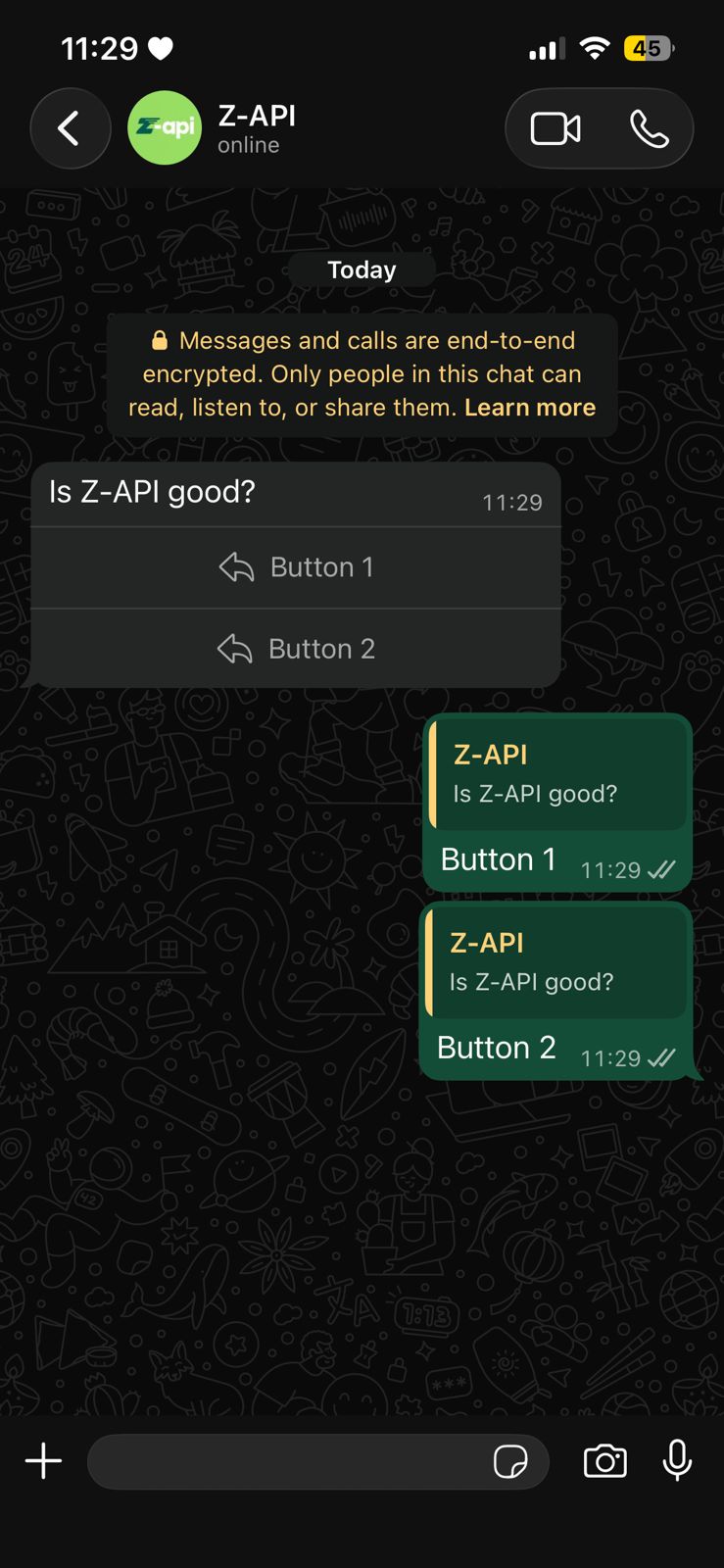
This endpoint allows you to reply to a button list option, simulating a user click on one of the options previously sent via send-button-list.The button must have been previously sent and the button ID must be obtained via the message received webhook.
Example on WhatsApp
Attributes
string
required
Your instance ID. Available in the Z-API panel under Instances.
string
required
Your Z-API instance token.
Required
string
required
Phone number (or group ID) in the format COUNTRY CODE + AREA CODE + NUMBER. Example: 551199999999
string
required
Selected button ID. This ID is obtained via the message received webhook.
string
required
ID of the message that contains the previously sent buttons.
Request Body
{
  "phone": "5511999999999",
  "responseButtonId": "1",
  "messageId": "D241XXXX732339502B68"
}
Response
200
string
Message ID in Z-API
string
Message ID in WhatsApp
string
Added for Zapier compatibility, it has the same value as messageId
{
  "zaapId": "3999984263738042930CD6ECDE9VDWSA",
  "messageId": "D241XXXX732339502B68",
  "id": "D241XXXX732339502B68"
}