
Send carousel
curl --request POST \
  --url https://api.z-api.io/instances/{instanceId}/token/{token}/send-carousel \
  --header 'Client-Token: <api-key>' \
  --header 'Content-Type: application/json' \
  --data '
{
  "phone": "<string>",
  "message": "<string>",
  "carousel": [
    {
      "text": "<string>",
      "image": "<string>",
      "buttons": [
        {
          "id": "<string>",
          "label": "<string>",
          "type": "<string>",
          "url": "<string>",
          "phone": "<string>"
        }
      ]
    }
  ]
}
'
import requests
url = "https://api.z-api.io/instances/{instanceId}/token/{token}/send-carousel"
payload = {
"phone": "<string>",
"message": "<string>",
"carousel": [
{
"text": "<string>",
"image": "<string>",
"buttons": [
{
"id": "<string>",
"label": "<string>",
"type": "<string>",
"url": "<string>",
"phone": "<string>"
}
]
}
]
}
headers = {
"Client-Token": "<api-key>",
"Content-Type": "application/json"
}
response = requests.post(url, json=payload, headers=headers)
print(response.text)const options = {
method: 'POST',
headers: {'Client-Token': '<api-key>', 'Content-Type': 'application/json'},
body: JSON.stringify({
phone: '<string>',
message: '<string>',
carousel: [
{
text: '<string>',
image: '<string>',
buttons: [
{
id: '<string>',
label: '<string>',
type: '<string>',
url: '<string>',
phone: '<string>'
}
]
}
]
})
};
fetch('https://api.z-api.io/instances/{instanceId}/token/{token}/send-carousel', options)
.then(res => res.json())
.then(res => console.log(res))
.catch(err => console.error(err));<?php
$curl = curl_init();
curl_setopt_array($curl, [
CURLOPT_URL => "https://api.z-api.io/instances/{instanceId}/token/{token}/send-carousel",
CURLOPT_RETURNTRANSFER => true,
CURLOPT_ENCODING => "",
CURLOPT_MAXREDIRS => 10,
CURLOPT_TIMEOUT => 30,
CURLOPT_HTTP_VERSION => CURL_HTTP_VERSION_1_1,
CURLOPT_CUSTOMREQUEST => "POST",
CURLOPT_POSTFIELDS => json_encode([
'phone' => '<string>',
'message' => '<string>',
'carousel' => [
[
'text' => '<string>',
'image' => '<string>',
'buttons' => [
[
'id' => '<string>',
'label' => '<string>',
'type' => '<string>',
'url' => '<string>',
'phone' => '<string>'
]
]
]
]
]),
CURLOPT_HTTPHEADER => [
"Client-Token: <api-key>",
"Content-Type: application/json"
],
]);
$response = curl_exec($curl);
$err = curl_error($curl);
curl_close($curl);
if ($err) {
echo "cURL Error #:" . $err;
} else {
echo $response;
}package main
import (
"fmt"
"strings"
"net/http"
"io"
)
func main() {
url := "https://api.z-api.io/instances/{instanceId}/token/{token}/send-carousel"
payload := strings.NewReader("{\n \"phone\": \"<string>\",\n \"message\": \"<string>\",\n \"carousel\": [\n {\n \"text\": \"<string>\",\n \"image\": \"<string>\",\n \"buttons\": [\n {\n \"id\": \"<string>\",\n \"label\": \"<string>\",\n \"type\": \"<string>\",\n \"url\": \"<string>\",\n \"phone\": \"<string>\"\n }\n ]\n }\n ]\n}")
req, _ := http.NewRequest("POST", url, payload)
req.Header.Add("Client-Token", "<api-key>")
req.Header.Add("Content-Type", "application/json")
res, _ := http.DefaultClient.Do(req)
defer res.Body.Close()
body, _ := io.ReadAll(res.Body)
fmt.Println(string(body))
}HttpResponse<String> response = Unirest.post("https://api.z-api.io/instances/{instanceId}/token/{token}/send-carousel")
.header("Client-Token", "<api-key>")
.header("Content-Type", "application/json")
.body("{\n \"phone\": \"<string>\",\n \"message\": \"<string>\",\n \"carousel\": [\n {\n \"text\": \"<string>\",\n \"image\": \"<string>\",\n \"buttons\": [\n {\n \"id\": \"<string>\",\n \"label\": \"<string>\",\n \"type\": \"<string>\",\n \"url\": \"<string>\",\n \"phone\": \"<string>\"\n }\n ]\n }\n ]\n}")
.asString();require 'uri'
require 'net/http'
url = URI("https://api.z-api.io/instances/{instanceId}/token/{token}/send-carousel")
http = Net::HTTP.new(url.host, url.port)
http.use_ssl = true
request = Net::HTTP::Post.new(url)
request["Client-Token"] = '<api-key>'
request["Content-Type"] = 'application/json'
request.body = "{\n \"phone\": \"<string>\",\n \"message\": \"<string>\",\n \"carousel\": [\n {\n \"text\": \"<string>\",\n \"image\": \"<string>\",\n \"buttons\": [\n {\n \"id\": \"<string>\",\n \"label\": \"<string>\",\n \"type\": \"<string>\",\n \"url\": \"<string>\",\n \"phone\": \"<string>\"\n }\n ]\n }\n ]\n}"
response = http.request(request)
puts response.read_bodyMessages
Send carousel
Send a carousel message with images, text and action buttons
POST
/
instances
/
{instanceId}
/
token
/
{token}
/
send-carousel
Send carousel
curl --request POST \
  --url https://api.z-api.io/instances/{instanceId}/token/{token}/send-carousel \
  --header 'Client-Token: <api-key>' \
  --header 'Content-Type: application/json' \
  --data '
{
  "phone": "<string>",
  "message": "<string>",
  "carousel": [
    {
      "text": "<string>",
      "image": "<string>",
      "buttons": [
        {
          "id": "<string>",
          "label": "<string>",
          "type": "<string>",
          "url": "<string>",
          "phone": "<string>"
        }
      ]
    }
  ]
}
'
import requests
url = "https://api.z-api.io/instances/{instanceId}/token/{token}/send-carousel"
payload = {
"phone": "<string>",
"message": "<string>",
"carousel": [
{
"text": "<string>",
"image": "<string>",
"buttons": [
{
"id": "<string>",
"label": "<string>",
"type": "<string>",
"url": "<string>",
"phone": "<string>"
}
]
}
]
}
headers = {
"Client-Token": "<api-key>",
"Content-Type": "application/json"
}
response = requests.post(url, json=payload, headers=headers)
print(response.text)const options = {
method: 'POST',
headers: {'Client-Token': '<api-key>', 'Content-Type': 'application/json'},
body: JSON.stringify({
phone: '<string>',
message: '<string>',
carousel: [
{
text: '<string>',
image: '<string>',
buttons: [
{
id: '<string>',
label: '<string>',
type: '<string>',
url: '<string>',
phone: '<string>'
}
]
}
]
})
};
fetch('https://api.z-api.io/instances/{instanceId}/token/{token}/send-carousel', options)
.then(res => res.json())
.then(res => console.log(res))
.catch(err => console.error(err));<?php
$curl = curl_init();
curl_setopt_array($curl, [
CURLOPT_URL => "https://api.z-api.io/instances/{instanceId}/token/{token}/send-carousel",
CURLOPT_RETURNTRANSFER => true,
CURLOPT_ENCODING => "",
CURLOPT_MAXREDIRS => 10,
CURLOPT_TIMEOUT => 30,
CURLOPT_HTTP_VERSION => CURL_HTTP_VERSION_1_1,
CURLOPT_CUSTOMREQUEST => "POST",
CURLOPT_POSTFIELDS => json_encode([
'phone' => '<string>',
'message' => '<string>',
'carousel' => [
[
'text' => '<string>',
'image' => '<string>',
'buttons' => [
[
'id' => '<string>',
'label' => '<string>',
'type' => '<string>',
'url' => '<string>',
'phone' => '<string>'
]
]
]
]
]),
CURLOPT_HTTPHEADER => [
"Client-Token: <api-key>",
"Content-Type: application/json"
],
]);
$response = curl_exec($curl);
$err = curl_error($curl);
curl_close($curl);
if ($err) {
echo "cURL Error #:" . $err;
} else {
echo $response;
}package main
import (
"fmt"
"strings"
"net/http"
"io"
)
func main() {
url := "https://api.z-api.io/instances/{instanceId}/token/{token}/send-carousel"
payload := strings.NewReader("{\n \"phone\": \"<string>\",\n \"message\": \"<string>\",\n \"carousel\": [\n {\n \"text\": \"<string>\",\n \"image\": \"<string>\",\n \"buttons\": [\n {\n \"id\": \"<string>\",\n \"label\": \"<string>\",\n \"type\": \"<string>\",\n \"url\": \"<string>\",\n \"phone\": \"<string>\"\n }\n ]\n }\n ]\n}")
req, _ := http.NewRequest("POST", url, payload)
req.Header.Add("Client-Token", "<api-key>")
req.Header.Add("Content-Type", "application/json")
res, _ := http.DefaultClient.Do(req)
defer res.Body.Close()
body, _ := io.ReadAll(res.Body)
fmt.Println(string(body))
}HttpResponse<String> response = Unirest.post("https://api.z-api.io/instances/{instanceId}/token/{token}/send-carousel")
.header("Client-Token", "<api-key>")
.header("Content-Type", "application/json")
.body("{\n \"phone\": \"<string>\",\n \"message\": \"<string>\",\n \"carousel\": [\n {\n \"text\": \"<string>\",\n \"image\": \"<string>\",\n \"buttons\": [\n {\n \"id\": \"<string>\",\n \"label\": \"<string>\",\n \"type\": \"<string>\",\n \"url\": \"<string>\",\n \"phone\": \"<string>\"\n }\n ]\n }\n ]\n}")
.asString();require 'uri'
require 'net/http'
url = URI("https://api.z-api.io/instances/{instanceId}/token/{token}/send-carousel")
http = Net::HTTP.new(url.host, url.port)
http.use_ssl = true
request = Net::HTTP::Post.new(url)
request["Client-Token"] = '<api-key>'
request["Content-Type"] = 'application/json'
request.body = "{\n \"phone\": \"<string>\",\n \"message\": \"<string>\",\n \"carousel\": [\n {\n \"text\": \"<string>\",\n \"image\": \"<string>\",\n \"buttons\": [\n {\n \"id\": \"<string>\",\n \"label\": \"<string>\",\n \"type\": \"<string>\",\n \"url\": \"<string>\",\n \"phone\": \"<string>\"\n }\n ]\n }\n ]\n}"
response = http.request(request)
puts response.read_bodyOverview
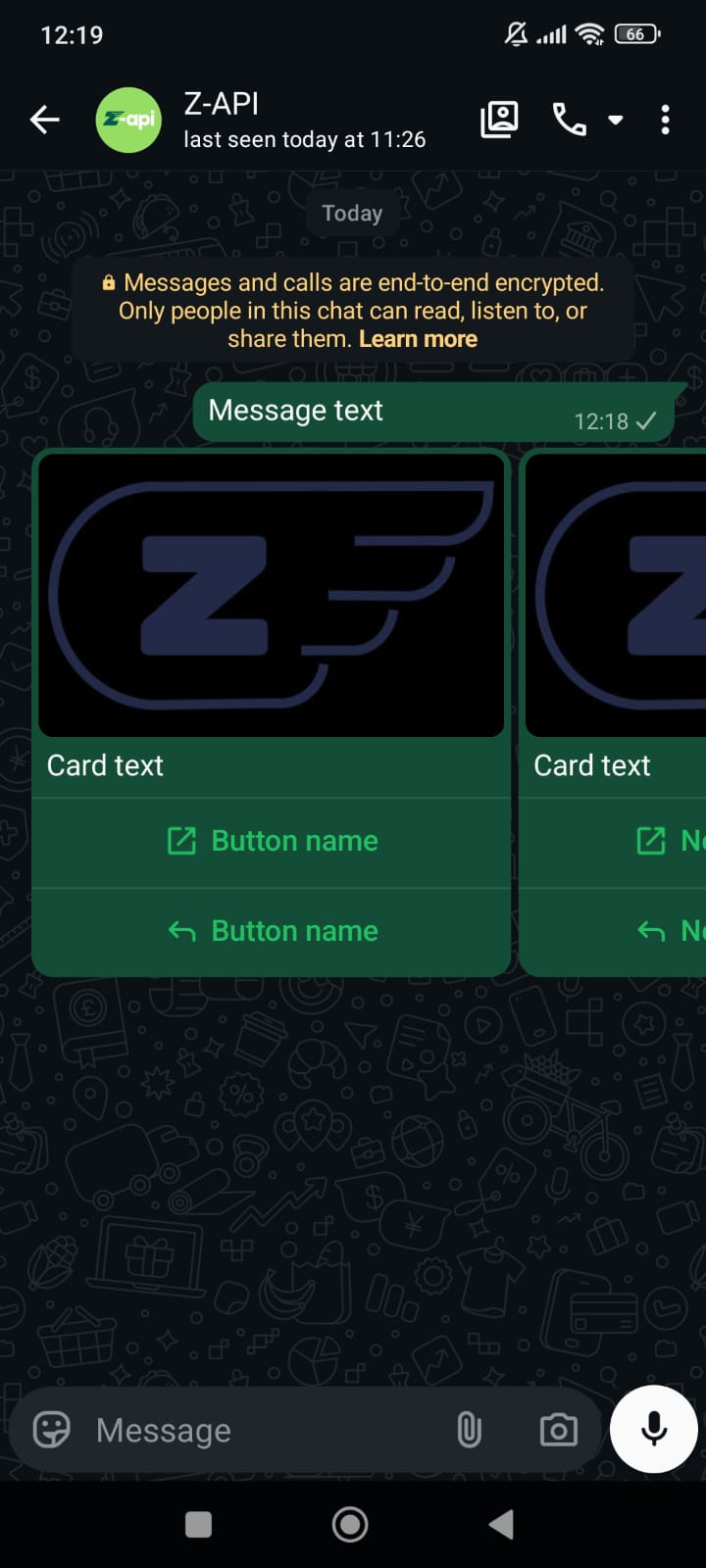
With this method you can send carousel messages with images, text and action buttons. From the action buttons, you can redirect to links, make calls, and also provide standard responses.Example on WhatsApp
Attributes
Header
string
required
Your instance ID. Available in the Z-API panel under Instances.
string
required
Your Z-API instance token.
Required
string
required
Recipient’s phone number (or group ID for group messages) in DDI DDD NUMBER format. E.g.: 551199999999
string
required
Message text
array
required
Array of carousel cards
Show Card properties
Show Card properties
Optional
number
Delay added to the message. You can choose between a range of 1 to 15 sec, meaning how many seconds it will wait before sending the next message. (E.g.: “delayMessage”: 5). The default delay if not provided is 1 to 3 sec
Request Body
{
  "phone": "551199999999",
  "message": "Message text",
  "carousel": [
    {
      "text": "Card text",
      "image": "https://firebasestorage.googleapis.com/v0/b/zaap-messenger-web.appspot.com/o/logo.png?alt=media",
      "buttons": [
        {
          "id": "1",
          "label": "Button name",
          "url": "https://z-api.io",
          "type": "URL"
        },
        {
          "id": "2",
          "label": "Button name",
          "type": "REPLY"
        }
      ]
    },
    {
      "text": "Card text",
      "image": "https://firebasestorage.googleapis.com/v0/b/zaap-messenger-web.appspot.com/o/logo.png?alt=media",
      "buttons": [
        {
          "id": "1",
          "label": "Button name",
          "url": "https://z-api.io",
          "type": "URL"
        },
        {
          "id": "2",
          "label": "Button name",
          "type": "REPLY"
        }
      ]
    }
  ]
}
Response
200
{
  "zaapId": "3999984263738042930CD6ECDE9VDWSA",
  "messageId": "D241XXXX732339502B68",
  "id": "D241XXXX732339502B68"
}