
Update order status
curl --request POST \
  --url https://api.z-api.io/instances/{instanceId}/token/{token}/order-status-update \
  --header 'Client-Token: <api-key>' \
  --header 'Content-Type: application/json' \
  --data '
{
  "phone": "<string>",
  "messageId": "<string>",
  "referenceId": "<string>",
  "orderRequestId": "<string>",
  "orderStatus": "<string>",
  "paymentStatus": "<string>",
  "order": {
    "currency": "<string>",
    "products": [
      {
        "name": "<string>",
        "value": 123,
        "quantity": 123,
        "productId": "<string>",
        "isCustomItem": true
      }
    ],
    "discount": 123,
    "tax": 123,
    "shipping": 123
  }
}
'
import requests
url = "https://api.z-api.io/instances/{instanceId}/token/{token}/order-status-update"
payload = {
"phone": "<string>",
"messageId": "<string>",
"referenceId": "<string>",
"orderRequestId": "<string>",
"orderStatus": "<string>",
"paymentStatus": "<string>",
"order": {
"currency": "<string>",
"products": [
{
"name": "<string>",
"value": 123,
"quantity": 123,
"productId": "<string>",
"isCustomItem": True
}
],
"discount": 123,
"tax": 123,
"shipping": 123
}
}
headers = {
"Client-Token": "<api-key>",
"Content-Type": "application/json"
}
response = requests.post(url, json=payload, headers=headers)
print(response.text)const options = {
method: 'POST',
headers: {'Client-Token': '<api-key>', 'Content-Type': 'application/json'},
body: JSON.stringify({
phone: '<string>',
messageId: '<string>',
referenceId: '<string>',
orderRequestId: '<string>',
orderStatus: '<string>',
paymentStatus: '<string>',
order: {
currency: '<string>',
products: [
{
name: '<string>',
value: 123,
quantity: 123,
productId: '<string>',
isCustomItem: true
}
],
discount: 123,
tax: 123,
shipping: 123
}
})
};
fetch('https://api.z-api.io/instances/{instanceId}/token/{token}/order-status-update', options)
.then(res => res.json())
.then(res => console.log(res))
.catch(err => console.error(err));<?php
$curl = curl_init();
curl_setopt_array($curl, [
CURLOPT_URL => "https://api.z-api.io/instances/{instanceId}/token/{token}/order-status-update",
CURLOPT_RETURNTRANSFER => true,
CURLOPT_ENCODING => "",
CURLOPT_MAXREDIRS => 10,
CURLOPT_TIMEOUT => 30,
CURLOPT_HTTP_VERSION => CURL_HTTP_VERSION_1_1,
CURLOPT_CUSTOMREQUEST => "POST",
CURLOPT_POSTFIELDS => json_encode([
'phone' => '<string>',
'messageId' => '<string>',
'referenceId' => '<string>',
'orderRequestId' => '<string>',
'orderStatus' => '<string>',
'paymentStatus' => '<string>',
'order' => [
'currency' => '<string>',
'products' => [
[
'name' => '<string>',
'value' => 123,
'quantity' => 123,
'productId' => '<string>',
'isCustomItem' => true
]
],
'discount' => 123,
'tax' => 123,
'shipping' => 123
]
]),
CURLOPT_HTTPHEADER => [
"Client-Token: <api-key>",
"Content-Type: application/json"
],
]);
$response = curl_exec($curl);
$err = curl_error($curl);
curl_close($curl);
if ($err) {
echo "cURL Error #:" . $err;
} else {
echo $response;
}package main
import (
"fmt"
"strings"
"net/http"
"io"
)
func main() {
url := "https://api.z-api.io/instances/{instanceId}/token/{token}/order-status-update"
payload := strings.NewReader("{\n \"phone\": \"<string>\",\n \"messageId\": \"<string>\",\n \"referenceId\": \"<string>\",\n \"orderRequestId\": \"<string>\",\n \"orderStatus\": \"<string>\",\n \"paymentStatus\": \"<string>\",\n \"order\": {\n \"currency\": \"<string>\",\n \"products\": [\n {\n \"name\": \"<string>\",\n \"value\": 123,\n \"quantity\": 123,\n \"productId\": \"<string>\",\n \"isCustomItem\": true\n }\n ],\n \"discount\": 123,\n \"tax\": 123,\n \"shipping\": 123\n }\n}")
req, _ := http.NewRequest("POST", url, payload)
req.Header.Add("Client-Token", "<api-key>")
req.Header.Add("Content-Type", "application/json")
res, _ := http.DefaultClient.Do(req)
defer res.Body.Close()
body, _ := io.ReadAll(res.Body)
fmt.Println(string(body))
}HttpResponse<String> response = Unirest.post("https://api.z-api.io/instances/{instanceId}/token/{token}/order-status-update")
.header("Client-Token", "<api-key>")
.header("Content-Type", "application/json")
.body("{\n \"phone\": \"<string>\",\n \"messageId\": \"<string>\",\n \"referenceId\": \"<string>\",\n \"orderRequestId\": \"<string>\",\n \"orderStatus\": \"<string>\",\n \"paymentStatus\": \"<string>\",\n \"order\": {\n \"currency\": \"<string>\",\n \"products\": [\n {\n \"name\": \"<string>\",\n \"value\": 123,\n \"quantity\": 123,\n \"productId\": \"<string>\",\n \"isCustomItem\": true\n }\n ],\n \"discount\": 123,\n \"tax\": 123,\n \"shipping\": 123\n }\n}")
.asString();require 'uri'
require 'net/http'
url = URI("https://api.z-api.io/instances/{instanceId}/token/{token}/order-status-update")
http = Net::HTTP.new(url.host, url.port)
http.use_ssl = true
request = Net::HTTP::Post.new(url)
request["Client-Token"] = '<api-key>'
request["Content-Type"] = 'application/json'
request.body = "{\n \"phone\": \"<string>\",\n \"messageId\": \"<string>\",\n \"referenceId\": \"<string>\",\n \"orderRequestId\": \"<string>\",\n \"orderStatus\": \"<string>\",\n \"paymentStatus\": \"<string>\",\n \"order\": {\n \"currency\": \"<string>\",\n \"products\": [\n {\n \"name\": \"<string>\",\n \"value\": 123,\n \"quantity\": 123,\n \"productId\": \"<string>\",\n \"isCustomItem\": true\n }\n ],\n \"discount\": 123,\n \"tax\": 123,\n \"shipping\": 123\n }\n}"
response = http.request(request)
puts response.read_bodyMessages
Update order status
Send an order status update
POST
/
instances
/
{instanceId}
/
token
/
{token}
/
order-status-update
Update order status
curl --request POST \
  --url https://api.z-api.io/instances/{instanceId}/token/{token}/order-status-update \
  --header 'Client-Token: <api-key>' \
  --header 'Content-Type: application/json' \
  --data '
{
  "phone": "<string>",
  "messageId": "<string>",
  "referenceId": "<string>",
  "orderRequestId": "<string>",
  "orderStatus": "<string>",
  "paymentStatus": "<string>",
  "order": {
    "currency": "<string>",
    "products": [
      {
        "name": "<string>",
        "value": 123,
        "quantity": 123,
        "productId": "<string>",
        "isCustomItem": true
      }
    ],
    "discount": 123,
    "tax": 123,
    "shipping": 123
  }
}
'
import requests
url = "https://api.z-api.io/instances/{instanceId}/token/{token}/order-status-update"
payload = {
"phone": "<string>",
"messageId": "<string>",
"referenceId": "<string>",
"orderRequestId": "<string>",
"orderStatus": "<string>",
"paymentStatus": "<string>",
"order": {
"currency": "<string>",
"products": [
{
"name": "<string>",
"value": 123,
"quantity": 123,
"productId": "<string>",
"isCustomItem": True
}
],
"discount": 123,
"tax": 123,
"shipping": 123
}
}
headers = {
"Client-Token": "<api-key>",
"Content-Type": "application/json"
}
response = requests.post(url, json=payload, headers=headers)
print(response.text)const options = {
method: 'POST',
headers: {'Client-Token': '<api-key>', 'Content-Type': 'application/json'},
body: JSON.stringify({
phone: '<string>',
messageId: '<string>',
referenceId: '<string>',
orderRequestId: '<string>',
orderStatus: '<string>',
paymentStatus: '<string>',
order: {
currency: '<string>',
products: [
{
name: '<string>',
value: 123,
quantity: 123,
productId: '<string>',
isCustomItem: true
}
],
discount: 123,
tax: 123,
shipping: 123
}
})
};
fetch('https://api.z-api.io/instances/{instanceId}/token/{token}/order-status-update', options)
.then(res => res.json())
.then(res => console.log(res))
.catch(err => console.error(err));<?php
$curl = curl_init();
curl_setopt_array($curl, [
CURLOPT_URL => "https://api.z-api.io/instances/{instanceId}/token/{token}/order-status-update",
CURLOPT_RETURNTRANSFER => true,
CURLOPT_ENCODING => "",
CURLOPT_MAXREDIRS => 10,
CURLOPT_TIMEOUT => 30,
CURLOPT_HTTP_VERSION => CURL_HTTP_VERSION_1_1,
CURLOPT_CUSTOMREQUEST => "POST",
CURLOPT_POSTFIELDS => json_encode([
'phone' => '<string>',
'messageId' => '<string>',
'referenceId' => '<string>',
'orderRequestId' => '<string>',
'orderStatus' => '<string>',
'paymentStatus' => '<string>',
'order' => [
'currency' => '<string>',
'products' => [
[
'name' => '<string>',
'value' => 123,
'quantity' => 123,
'productId' => '<string>',
'isCustomItem' => true
]
],
'discount' => 123,
'tax' => 123,
'shipping' => 123
]
]),
CURLOPT_HTTPHEADER => [
"Client-Token: <api-key>",
"Content-Type: application/json"
],
]);
$response = curl_exec($curl);
$err = curl_error($curl);
curl_close($curl);
if ($err) {
echo "cURL Error #:" . $err;
} else {
echo $response;
}package main
import (
"fmt"
"strings"
"net/http"
"io"
)
func main() {
url := "https://api.z-api.io/instances/{instanceId}/token/{token}/order-status-update"
payload := strings.NewReader("{\n \"phone\": \"<string>\",\n \"messageId\": \"<string>\",\n \"referenceId\": \"<string>\",\n \"orderRequestId\": \"<string>\",\n \"orderStatus\": \"<string>\",\n \"paymentStatus\": \"<string>\",\n \"order\": {\n \"currency\": \"<string>\",\n \"products\": [\n {\n \"name\": \"<string>\",\n \"value\": 123,\n \"quantity\": 123,\n \"productId\": \"<string>\",\n \"isCustomItem\": true\n }\n ],\n \"discount\": 123,\n \"tax\": 123,\n \"shipping\": 123\n }\n}")
req, _ := http.NewRequest("POST", url, payload)
req.Header.Add("Client-Token", "<api-key>")
req.Header.Add("Content-Type", "application/json")
res, _ := http.DefaultClient.Do(req)
defer res.Body.Close()
body, _ := io.ReadAll(res.Body)
fmt.Println(string(body))
}HttpResponse<String> response = Unirest.post("https://api.z-api.io/instances/{instanceId}/token/{token}/order-status-update")
.header("Client-Token", "<api-key>")
.header("Content-Type", "application/json")
.body("{\n \"phone\": \"<string>\",\n \"messageId\": \"<string>\",\n \"referenceId\": \"<string>\",\n \"orderRequestId\": \"<string>\",\n \"orderStatus\": \"<string>\",\n \"paymentStatus\": \"<string>\",\n \"order\": {\n \"currency\": \"<string>\",\n \"products\": [\n {\n \"name\": \"<string>\",\n \"value\": 123,\n \"quantity\": 123,\n \"productId\": \"<string>\",\n \"isCustomItem\": true\n }\n ],\n \"discount\": 123,\n \"tax\": 123,\n \"shipping\": 123\n }\n}")
.asString();require 'uri'
require 'net/http'
url = URI("https://api.z-api.io/instances/{instanceId}/token/{token}/order-status-update")
http = Net::HTTP.new(url.host, url.port)
http.use_ssl = true
request = Net::HTTP::Post.new(url)
request["Client-Token"] = '<api-key>'
request["Content-Type"] = 'application/json'
request.body = "{\n \"phone\": \"<string>\",\n \"messageId\": \"<string>\",\n \"referenceId\": \"<string>\",\n \"orderRequestId\": \"<string>\",\n \"orderStatus\": \"<string>\",\n \"paymentStatus\": \"<string>\",\n \"order\": {\n \"currency\": \"<string>\",\n \"products\": [\n {\n \"name\": \"<string>\",\n \"value\": 123,\n \"quantity\": 123,\n \"productId\": \"<string>\",\n \"isCustomItem\": true\n }\n ],\n \"discount\": 123,\n \"tax\": 123,\n \"shipping\": 123\n }\n}"
response = http.request(request)
puts response.read_bodyOverview
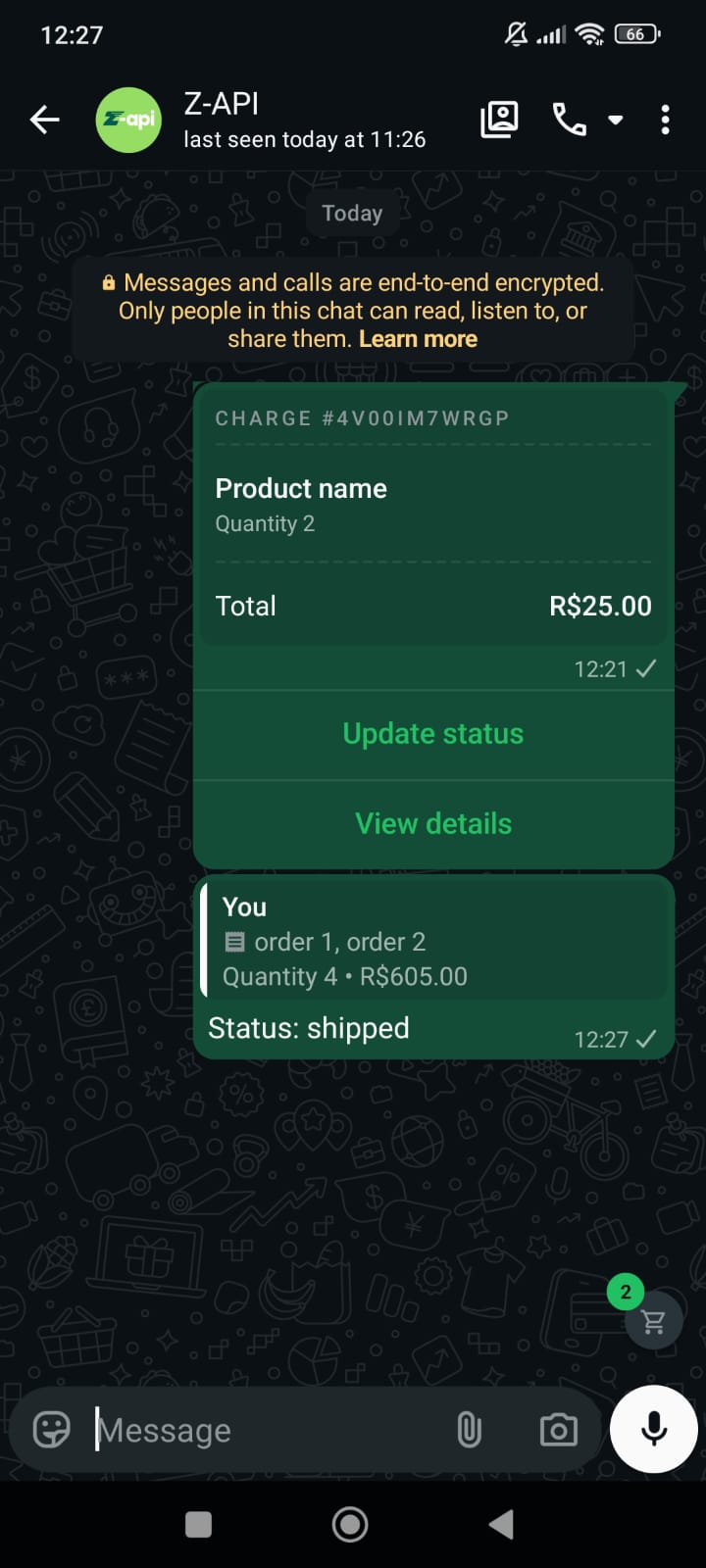
With this method you can send order status update messages.This method is only available for WhatsApp Business accounts. All original order data must be resent with the additional mandatory parameters returned via webhook.
Example on WhatsApp
Attributes
Header
string
required
Your instance ID. Available in the Z-API panel under Instances.
string
required
Your Z-API instance token.
Required
string
required
Recipient’s phone number in DDI DDD NUMBER format. E.g.: 551199999999
string
required
Original order message ID from WhatsApp
string
required
Order reference ID (obtained via webhook)
string
required
Order request reference ID (obtained via webhook)
string
required
New order status:
pending, processing, shipped, completed or canceledstring
required
Payment status:
pending or paidobject
required
Order data
Show Properties
Show Properties
string
required
Currency code (e.g.: BRL)
array
required
number
Discount amount
number
Tax amount
number
Shipping amount
Optional
string
Order update text message
Request Body
{
  "phone": "554499999999",
  "messageId": "3EB0F91BBA791BB0A787FC",
  "message": "Order update text message",
  "referenceId": "4N8FCTW1WM6",
  "orderRequestId": "4N8FCTW22W4",
  "orderStatus": "processing",
  "paymentStatus": "pending",
  "order": {
    "currency": "BRL",
    "discount": 10,
    "tax": 10,
    "shipping": 5,
    "products": [
      {
        "value": 150,
        "quantity": 2,
        "name": "order 1",
        "isCustomItem": true,
        "productId": "custom-item-4N8FCTW23N7"
      },
      {
        "productId": "23940797548900636",
        "value": 150,
        "quantity": 2,
        "name": "order 2",
        "isCustomItem": false
      }
    ]
  }
}
Response
200
{
  "zaapId": "3999984263738042930CD6ECDE9VDWSA",
  "messageId": "D241XXXX732339502B68",
  "id": "D241XXXX732339502B68"
}